You got an awesome pair of Anker headphones or speakers, you connected to the PC but you realized that you can’t adjust the bass because there is no native software to do that. Until now, the only solution for users was to install heavy and resource consuming Android emulators which will drain your CPU and RAM power.
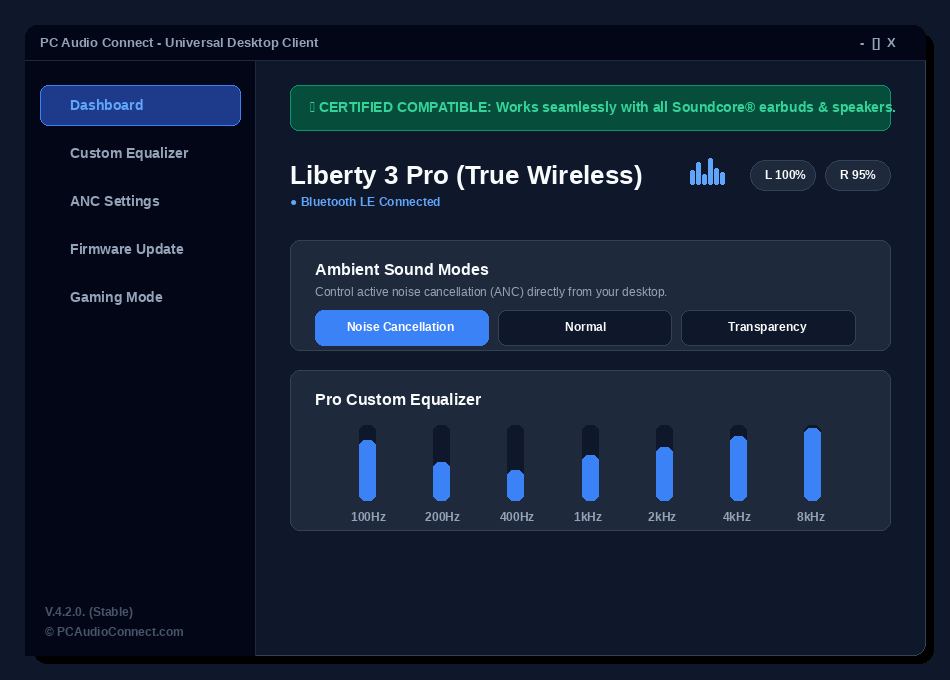
Those days are gone, we developed a native Anker Soundcore desktop software compatible with all devices without emulators and complications, just a free premium app which is super fast, build for PC’s and laptops. If you want to find how to use this Soundcore app for PC at his maximum capacity, you are in the right place.
Premium Features: Soundcore app features and Soundcore equalizer for PC
Apart from a mobile app which is forced to run on a PC in a virtual environment, our app called PC Audio Connect (Premium Edition) it’s a Soundcore software for Windows 10 and 11 which is build from 0 for absolute performance with is compatible with all Anker and non Anker products.
Lets mention some features of the Soundcore app for PC:
- No Emulators: It’s a .exe file clean and fast. You don’t need to connect accounts or install other tirth party tools.
- Soundcore Equalizer (7 bands): Adjust frequencies to obtain the perfect sound, exactly like the official mobile app, and save presets on your PC for later use.
- Ultra-Low Latency (Gaming Mode): bypass the standard Windows audio buffer to receive a 0 latency sound, ideally for gaming sessions.
- AI Voice Isolation: use the GPU power to completely remove noise from your microphone.
- Bluetooth Connection Manager: Activate Multipoint Pairing mode or disconnect your headphones or speakers with a single click inside the application.
Soundcore app download for Windows 10 and Windows 11. How to install the app?
Downloading and installing Soundcore app for PC its clean, safe and fast process.
- Download the app. Click the download button and obtain the latest version which is v.4.2.0.
- Install the app. Run the .exe file and follow the screen steps from the wizard installer.
- Connect your headphones or speakers: First make sure your device it is connected to bluetooth inside Windows.
- Enjoy the sound. Open the app. Our software will automatically detect your connected devices and will show the battery status. Browse the app and his features and start controlling your devices.
FAQ (Frequently asked questions)
Does Soundcore app save EQ settings in internal memory?
Yes, absolutely. Any settings that you make, our desktop app will transfer that to the devices and it will save then inside Soundcore internal memory. That means that your bass settings or 85dB Hearing Protection will remain active even if you close the app or connect headphones or speakers to other devices.
Is there any Soundcore app for MAC?
If you use a MAC with Apple Silicon M1, M2, etc, you can use the Soundcore app for Mac from the App Store (both mobile and PC). For Windows users this is why we developed this app.
Is there any other equalizer for Windows?
If you want just to modify the volume or other frequencies you can use generic system tools like Equalizer APO. Btw, this are only apps that modify the Windows sound equalizer and not apps that communicate without Anker Soundcore devices. You can’t read battery status, you can’t update firmware and cannot comute from transparency to Noise Cancellation.
